
给撞击做 blocking:用 Houdini 预演控制 AI 导弹打击
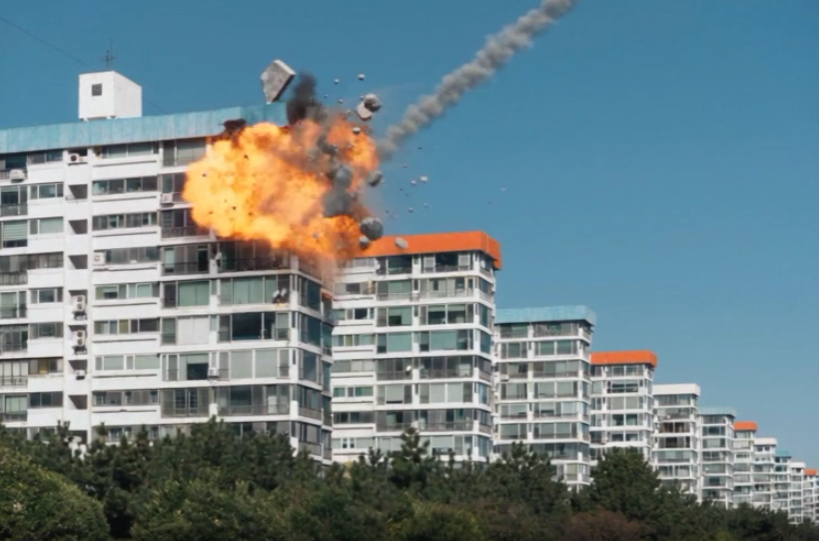
文字提示词擅长描述镜头里发生了什么,却很不擅长描述它发生在哪里。“导弹击中蓝色屋顶建筑的上方边角”听起来很精确,但视频模型每次运行都乐于选择不同的边角、不同的角度、不同的速度。在一个破坏镜头里,我想要的恰恰相反:只有一个精确的撞击点,只有一条精确的接近路径,而且破坏只限于屋顶的一小块范围内。
所以我不再试图用语言去描述,而是改在 3D 里做 blocking。下面是完整的过程,包括两次没有成功的尝试。
思路:在 3D 里做 blocking,让视频模型来“穿衣服”
像 Seedance 2.5 这样的参考生视频(reference-to-video)模型,可以同时接收一张首帧图像和一段参考视频。如果参考视频是一段没有纹理的灰色 3D 预演(previs),它就能承载提示词传达不了的东西:物体在哪里、怎么动、什么时候动。这样,模型的职责就是补上 3D 里比较慢的部分,也就是逼真的火焰、烟雾、玻璃和光线。
分工是这样的:
- Houdini 决定:镜头、撞击点、导弹的路径和速度、破坏的形状和方向。
- Seedance 决定:火焰、烟雾、混凝土、玻璃和树丛看起来是什么样。
第 1 步:照片与 blocking
我从网上找到的一张公寓楼群照片开始。这张照片有两个用途:它既是最终镜头的精确首帧,也是我在 3D 里对齐的布局。
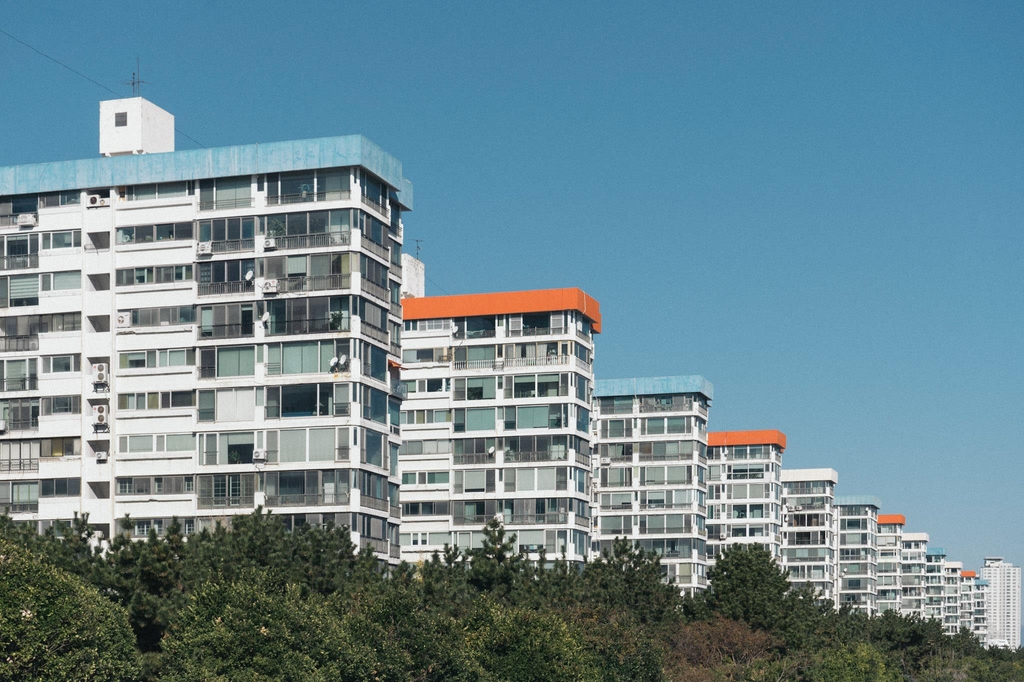
在 Houdini 里,我把摄像机对齐到照片上,并把这些建筑重建成简单的灰色方块。没有窗户,没有颜色,没有细节。我只需要干净的、可以被破坏的体积,而且模型看到的细节越少,它想去模仿的诱惑也就越少。(我是通过提示 Claude 来操作 Houdini 搭建的场景,所以迭代很快。)
第 2 步:只破坏该破坏的部分
RBD 设置的第一个版本,塌掉的地方太多了。我想要的,是建筑其余部分完好无损,只在屋顶的一个边角被“咬掉一口”的样子。有效的设置如下:
- 用 RBD Material Fracture 把方块碎裂,然后打包(pack)。
- 只让撞击点附近的碎块保持激活,其余的固定在原位,并用很强的 glue 约束粘住。
- 在撞击帧,一股短暂的爆炸力把边角附近的碎块向外推开,然后放手,让碎块自己滚落、自己停稳。
- 把地面下移约 2 米,给坠落的碎片留出空间。
这样,方块顶部会出现一个小而清晰的凹坑,碎片会飞离外墙,而不是穿过建筑的外立面。
第 3 步:用几何体画出导弹的路径
这是最关键的一步。视频模型看不到我的意图,它只能看到画面里存在的东西。所以我把导弹的路径变成肉眼可见的。
- 导弹从右上方沿着陡峭的对角线,从天空俯冲到屋顶边角。
- 导弹在撞击后不会消失,而是留在撞击点上的场景中,这样模型能看到它抵达了哪里。
- 一条细细的红线和一个箭头,沿着飞行的精确路径延伸。
红线只是给模型看的引导,并不是我希望出现在最终镜头里的东西。这一点马上还会再提到。
第 4 步:ComfyUI 中的 Seedance 2.5
我在 ComfyUI 里以参考生视频模式运行 Seedance 2.5,输入有两个:照片作为 @Image1(精确的首帧),预演 flipbook 作为 @Video1(运动、撞击点和破坏形态)。之后全是提示词的工作,我试了三次,才得到干净的结果。
第一次尝试:位置对了,其他都过头了
第一条提示词(保持英文原文):
Strictly use @Video1 as reference video for missile action, impact point and destruction shape on the blue roof building seen in @Image1. The red line and arrow in @Video1 only mark the missile’s flight path: follow that exact path, but do not show the red line or arrow in the final video. Use @Image1 as exact first frame.
A grey missile strikes the blue roof building and the impact is a bright flash and a fiery explosion centered on that roof corner, with a rolling fireball and a shockwave, at the scale of the building’s top corner. Concrete chunks, broken slabs and glass shards are blown outward to the right, away from the facade, and tumble through open air to the ground beside the building, following the same debris arcs as @Video1. Thick black and grey smoke and orange fire billow up from the blasted corner and drift to the right, with dust and small debris falling.
The missile disappears upon impact.
The destruction is limited to that one roof corner, matching the size and shape of the bite taken out of the corner in @Video1. The facade below the corner stays intact and clean, and the rest of the building and all the neighbouring buildings are untouched.
撞击点是准确的,仅此一点,就比我只用文字时得到的任何结果都好。问题全部出在特效上。
- 我要求了冲击波,它就画出了一个占满画面、发着光的巨大圆环。
- 碎片没有落在建筑旁边,而是一直飞到了很远的天空。
- 导弹是一个没有尾迹的、又小又快的点,很难看出它从哪里来。
- 火球和烟雾比预演里凹下去的那一块大得多。
第二次尝试:特效修好了,但引导线漏了出来
在第二条提示词里,我改的是特效,而不是结构。
- 去掉了冲击波,并加上了 “no visible shockwave ring and no distortion of the air or the sky”。
- 加入了导弹的速度:一次非常快、很短、很陡的俯冲,没有滑翔、没有悬停、也没有减速。
- 加入了一条细细的白色烟尾,从导弹尾部开始,撞击之后还会留在空中一会儿。
- 把碎片限制在短距离内:几块大的碎块和一些小碎片,落在建筑附近。
- 加入了画面下方树丛对撞击的反应:一道看不见的压力波掠过,碎片砸中树梢,但树不会着火,也不会被毁坏。
这样,大部分特效问题就解决了。冲击波消失了,尾迹有了,碎片也留在了近处。但是预演里红色的引导线,出现在了生成镜头的天空里。我明明说了不要渲染这条线,它还是画了出来。
第三次尝试:说两遍
第三次,我保留同一条提示词,但让关于引导线的指令不可能被漏掉。我把“不要显示红线或箭头”,改成了第一段里一句斩钉截铁的话(“Do not render the red line or arrow in the final video”),并在最末尾又加了一句收尾的话 “Do not render the red line and red arrow.”。我还把提示词拆成了短段落,每个想法一段:路径与速度、撞击与特效、树丛、以及破坏范围的限制。完整的提示词如下(保持英文原文):
Strictly use @Video1 as reference video for missile action, speed, impact point and destruction shape on the blue roof building seen in @Image1. The red line and arrow in @Video1 only mark the missile’s flight path: follow that exact path. Do not render the red line or arrow in the final video. Use @Image1 as exact first frame.
A grey missile dives along that path at the same speed as @Video1: one very fast, short, steep dive that hits the roof almost immediately, with no slow gliding, no hovering and no slowing down before impact. A thin white smoke trail follows the missile along the same path, starts at the missile’s tail and lingers in the air for a moment after impact.
The missile strikes the blue roof building, and the impact is a bright flash and a fiery explosion centered on that roof corner, with a compact rolling fireball at the scale of the building’s top corner. There is no visible shockwave ring and no distortion of the air or the sky. Concrete chunks, broken slabs and glass shards are blown outward to the right, away from the facade, and tumble through open air toward the ground beside the building, following the same debris arcs as @Video1. The debris travels only a short distance from the impact point, with a few larger chunks and some smaller fragments falling close to the side of the building, with a little outward drift and not thrown far into the distance. Thick black and grey smoke and orange fire billow up from the blasted corner and drift to the right, with dust and small debris falling.
The tree foliage along the bottom of the frame reacts to the impact. At the moment of impact an invisible pressure wave rolls through the trees: the treetops and branches nearest the building sway and shake sharply away from the impact, with leaves rustling and a few loose leaves blown off, and the reaction fades out with distance across the frame. When chunks of debris fall into the foliage, they crash into the treetops: branches bend and spring back, leaves burst out and flutter, and small puffs of dust and leaf fragments rise from the canopy. The foliage is only shaken and stirred, and it does not catch fire and is not destroyed.
The missile disappears upon impact.
The destruction is limited to that one roof corner, matching the size and shape of the bite taken out of the corner in @Video1. The facade below the corner stays intact and clean, and the rest of the building and all the neighbouring buildings are untouched.
Do not render the red line and red arrow.
天空干净了。只有白色烟尾,屋顶边角有一团紧凑的火球,黑烟和火焰只停留在被炸毁的边角周围,建筑的其余部分完好无损。每条提示词只有一个样本,所以我不能断言,重复的指令就是让那条线消失的原因。但第二次和第三次之间,实质性的改动就只有这一处。
预演 vs. 成片
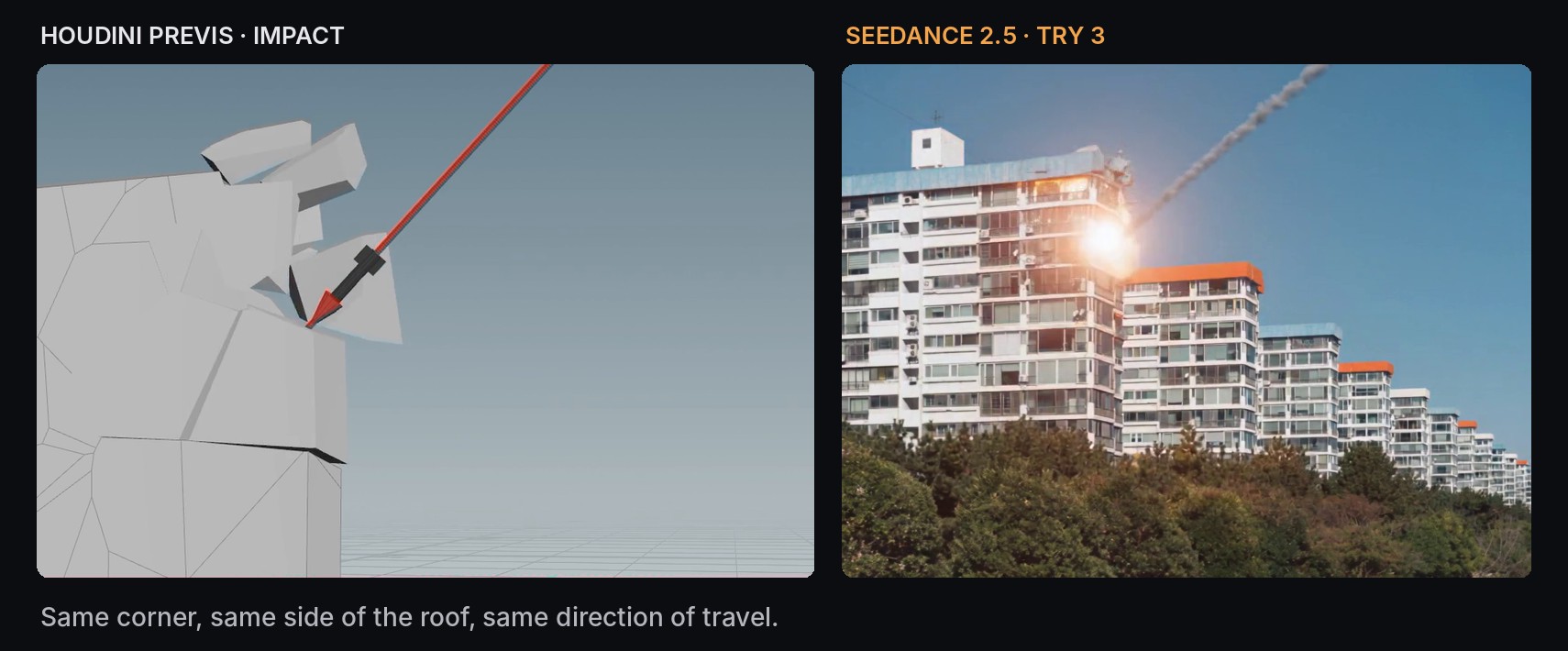
这两个画面并不是逐像素相同,也不需要相同。我想要的东西,也就是被击中的边角、导弹落下的那一侧屋顶、导弹飞来的方向,都被延续了下来。
这个项目的收获
- 凡是需要掌控的,就在 3D 里做 blocking。撞击点、路径、时机和破坏的大小,在 Houdini 里很容易设定,用文字却很难指望它可靠地做到。
- 预演保持简单。灰色方块只把布局传达给了模型,没有可供模仿的细节。
- 让意图肉眼可见。把导弹留在场景里、并画出它的路径,比任何一句描述角度的话都更有效。
- 让参考负责几何,让提示词负责外观。运动指向 @Video1,再用文字描述火焰、烟雾和碎片的大小。
- 明确说出不该出现的东西。如果参考里有引导物体,就明确告诉它不要渲染,并且做好说不止一遍的准备。
- 在特效上也要告诉它不该做什么。“No visible shockwave”和“debris travels only a short distance”,和正向的指令一样有效。
预演给了我一个每次都可以用提示词去瞄准的固定目标,所以每一次尝试,都是对同一个镜头的小幅修改,而不是一个新的随机镜头。