
Blocking the Hit: Controlling an AI Missile Strike with a Houdini Previs
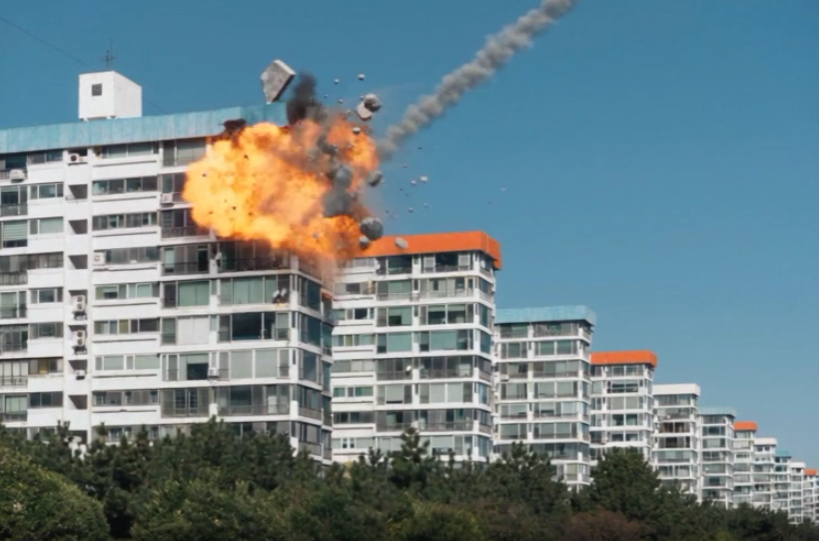
Text prompts are great at describing what happens in a shot and terrible at describing where. “The missile hits the top corner of the blue-roofed building” sounds precise, but a video model will happily pick a different corner, a different angle and a different speed on every run. For a destruction shot I wanted the opposite: one exact impact point, one exact approach, and damage that stays inside a small bite of the roof.
So I stopped trying to say it in words and blocked it in 3D instead. Here’s the whole process, including the two attempts that didn’t work.
The Idea: Block It in 3D, Let the Video Model Dress It
Reference-to-video models like Seedance 2.5 can take a first-frame image plus a reference video. If the reference video is a grey, textureless 3D previs, it carries the things a prompt can’t: where things are, how they move and when. The model’s job is then to add what 3D is slow at: realistic fire, smoke, glass and light.
The split looks like this:
- Houdini decides: the camera, the impact point, the missile’s path and speed, and the shape and direction of the destruction.
- Seedance decides: what the fire, smoke, concrete, glass and foliage look like.
Step 1: The Photo and the Blocking
I started with a single photo of a row of apartment blocks that I found online. It does two jobs: it is the exact first frame of the final shot, and it is the layout I matched in 3D.

In Houdini I matched the camera to the photo and rebuilt the buildings as plain grey blocks. No windows, no colors, no detail. All I needed was clean volumes to fracture, and the less detail the model sees, the less it is tempted to copy it. (I built the scene by prompting Claude to drive Houdini, which made the iterating quick.)
Step 2: Fracture Only the Part That Gets Hit
The first version of the RBD setup collapsed far too much. What I wanted was a bite out of one roof corner with the rest of the building left alone. The setup that worked:
- The block is fractured with RBD Material Fracture, then packed.
- Only pieces near the impact point stay active. Everything else is held in place and glued together with a strong glue constraint.
- At the impact frame, a short blast pushes the pieces near the corner outward and then lets go, so they tumble and settle on their own.
- I moved the ground plane about 2 m down so the debris has room to fall.
That gives a small, readable crater on the top edge of the block, with the debris flying away from the facade rather than through it.
Step 3: Draw the Missile’s Path as Geometry
This was the step that mattered most. A video model can’t see what I intended, only what is in the frame. So I made the missile’s route visible:
- The missile comes in from the upper right, on a steep diagonal, from the sky down to the roof corner.
- The missile stays in the scene at the impact point after it hits, instead of vanishing, so the model can see where it arrived.
- A thin red line and an arrowhead trace the exact path of the flight.
The red line is a guide for the model, not something I want in the final shot. That detail comes back in a moment.
Step 4: Seedance 2.5 in ComfyUI
In ComfyUI I ran Seedance 2.5 in reference-to-video mode with two inputs: the photo as @Image1 (the exact first frame) and the previs flipbook as @Video1 (the motion, impact point and destruction shape). Everything after that was prompting, and it took three tries to get a clean result.
Try 1: The Right Spot, Too Much Everything Else
My first prompt:
Strictly use @Video1 as reference video for missile action, impact point and destruction shape on the blue roof building seen in @Image1. The red line and arrow in @Video1 only mark the missile’s flight path: follow that exact path, but do not show the red line or arrow in the final video. Use @Image1 as exact first frame.
A grey missile strikes the blue roof building and the impact is a bright flash and a fiery explosion centered on that roof corner, with a rolling fireball and a shockwave, at the scale of the building’s top corner. Concrete chunks, broken slabs and glass shards are blown outward to the right, away from the facade, and tumble through open air to the ground beside the building, following the same debris arcs as @Video1. Thick black and grey smoke and orange fire billow up from the blasted corner and drift to the right, with dust and small debris falling.
The missile disappears upon impact.
The destruction is limited to that one roof corner, matching the size and shape of the bite taken out of the corner in @Video1. The facade below the corner stays intact and clean, and the rest of the building and all the neighbouring buildings are untouched.
The impact point was right, which already beat anything I got from words alone. The problems were all about the effects:
- I asked for a shockwave, and it drew a huge, glowing ring that dominated the frame.
- Debris flew far across the sky instead of dropping next to the building.
- The missile was a tiny, fast dot with no trail, so it was hard to read where it came from.
- The fireball and smoke were much bigger than the bite in the previs.
Try 2: Fixing the Effects, Leaking the Guide
For the second prompt I changed the effects, not the structure:
- Removed the shockwave and added “no visible shockwave ring and no distortion of the air or the sky.”
- Added the missile’s speed: one very fast, short, steep dive, no gliding, no hovering, no slowing down.
- Added a thin white smoke trail that starts at the missile’s tail and lingers after impact.
- Limited the debris to a short distance, a few larger chunks and smaller fragments falling close to the building.
- Added the tree foliage at the bottom of the frame reacting to the impact, with an invisible pressure wave and debris crashing into the treetops, without burning or being destroyed.
That fixed most of the effects. The shockwave was gone, the trail was there and the debris stayed closer. But the red guide line from the previs showed up in the sky in the generated shot. I had told it not to render the line, and it did anyway.
Try 3: Say It Twice
For the third try I kept the same prompt and made the instruction about the guide unmissable. I turned “do not show the red line or arrow” into a firm sentence in the first paragraph (“Do not render the red line or arrow in the final video”) and added a closing line, “Do not render the red line and red arrow,” at the very end. I also split the prompt into short paragraphs, one per idea: path and speed, impact and effects, foliage, and limits on the damage. This is the full prompt:
Strictly use @Video1 as reference video for missile action, speed, impact point and destruction shape on the blue roof building seen in @Image1. The red line and arrow in @Video1 only mark the missile’s flight path: follow that exact path. Do not render the red line or arrow in the final video. Use @Image1 as exact first frame.
A grey missile dives along that path at the same speed as @Video1: one very fast, short, steep dive that hits the roof almost immediately, with no slow gliding, no hovering and no slowing down before impact. A thin white smoke trail follows the missile along the same path, starts at the missile’s tail and lingers in the air for a moment after impact.
The missile strikes the blue roof building, and the impact is a bright flash and a fiery explosion centered on that roof corner, with a compact rolling fireball at the scale of the building’s top corner. There is no visible shockwave ring and no distortion of the air or the sky. Concrete chunks, broken slabs and glass shards are blown outward to the right, away from the facade, and tumble through open air toward the ground beside the building, following the same debris arcs as @Video1. The debris travels only a short distance from the impact point, with a few larger chunks and some smaller fragments falling close to the side of the building, with a little outward drift and not thrown far into the distance. Thick black and grey smoke and orange fire billow up from the blasted corner and drift to the right, with dust and small debris falling.
The tree foliage along the bottom of the frame reacts to the impact. At the moment of impact an invisible pressure wave rolls through the trees: the treetops and branches nearest the building sway and shake sharply away from the impact, with leaves rustling and a few loose leaves blown off, and the reaction fades out with distance across the frame. When chunks of debris fall into the foliage, they crash into the treetops: branches bend and spring back, leaves burst out and flutter, and small puffs of dust and leaf fragments rise from the canopy. The foliage is only shaken and stirred, and it does not catch fire and is not destroyed.
The missile disappears upon impact.
The destruction is limited to that one roof corner, matching the size and shape of the bite taken out of the corner in @Video1. The facade below the corner stays intact and clean, and the rest of the building and all the neighbouring buildings are untouched.
Do not render the red line and red arrow.
The sky came out clean, with just the white smoke trail, a compact fireball on the roof corner, black smoke and fire staying around the damaged corner, and the rest of the building untouched. One sample per prompt isn’t proof, so I can’t say for certain it was the repeated instruction that removed the line. It is the only substantive change between tries 2 and 3.
Previs vs. Final
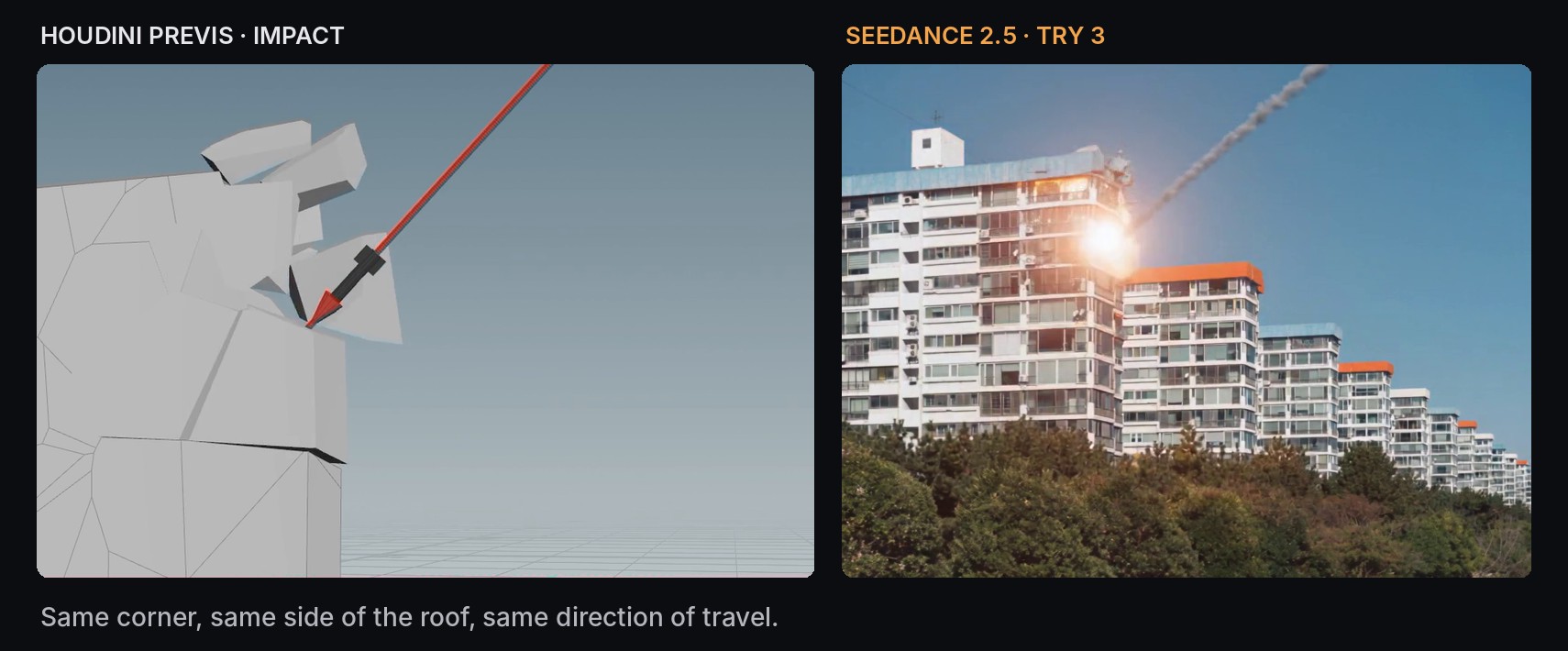
The two aren’t pixel-identical, and they don’t need to be. What carries over is what I was after: the corner that takes the hit, the side of the roof it lands on and the direction the missile travels from.
What I’d Take Away From This
- Block what you need to control, in 3D. Impact point, path, timing and the size of the damage are cheap to set in Houdini and unreliable to ask for in text.
- Keep the previs plain. Grey blocks gave the model the layout without any detail to copy.
- Make intent visible. Leaving the missile in the scene and drawing its path did more than any sentence describing the angle.
- Let the reference carry geometry and keep the prompt for the look. Point at @Video1 for the motion and use the words for fire, smoke and debris scale.
- Be explicit about what not to show. If a guide object is in your reference, tell the model not to render it, and be ready to say so more than once.
- Tell it what not to do with the effects too. “No visible shockwave” and “debris travels only a short distance” did as much as the positive instructions.
The previs gave me a fixed target to prompt against every time, so each try was a small fix to the same shot instead of a new random one.