
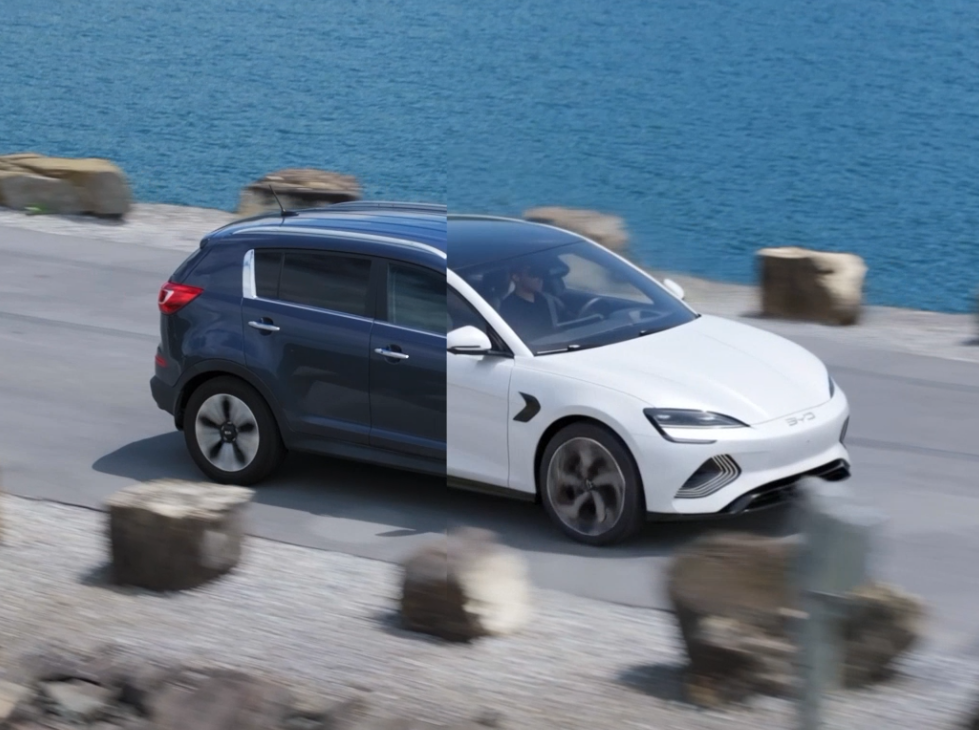
So, here’s a classic indie film scenario. You finally lock picture on a scene, everything is tracking nicely, and the director is happy. Then the producer walks into the post suite with a massive grin because they just closed a last-minute Product Placement (PPL) deal with BYD. The catch? The car we actually shot on location during a smooth, 5-second aerial drone sequence is a bright blue SUV. Now, it absolutely has to be a white BYD car.
Instead of booking an expensive reshoot or spending days on a full 3D asset tracking pipeline, I wanted to see if I could solve this using a generative AI workflow while keeping the original Full HD plate completely crisp.
Here’s how the process went, the roadblocks I hit, and how I blended AI with traditional compositing to make the shot work.
Avoiding the “AI Hallucination” Trap
When you’re doing a specific vehicle swap for a brand, your biggest hurdle is fidelity. If the AI shifts the contours or gives it a weird generic shape, the illusion falls apart instantly. Since newer EV models like BYD aren’t heavily represented in standard base AI models, my biggest concern was making sure the model wouldn’t hallucinate a totally different car.
I figured the easiest path would be a First Frame + Video-to-Video workflow.
First Frame + Seedance 2.0
I pulled the first frame of the drone shot, grabbed a reference photo of the white BYD car from the internet, and used Nano Banana Pro to generate a clean, structurally accurate first frame.
Then I tossed that generation into Seedance 2.0 for the video-to-video pass. The car reproduction was solid, and it actually nailed the layout of the wheels. However, the environment continuity completely broke down. After a few frames, the background would suddenly jump out of alignment, making the footage completely unusable for a continuous camera move.
Switching to Kling
I ran the exact same first-frame setup through Kling instead. Kling handled the camera tracking perfectly, and the spatial continuity matched the smooth, sweeping drone move exactly.
The downside was the overall image quality of the output. The original footage had a lot of motion blur from the drone’s speed, and the model struggled to upscale those fine details cleanly, leaving the plate looking pretty muddy.
Cutting Out the AI Noise
At this point, you don’t just throw your hands up; you use traditional VFX logic. If the AI environment looks messy but the car tracking is spot-on, you isolate the car and throw away the rest of the AI noise.
To keep the original Full HD drone plate completely clean, I built a quick compositing bridge. I rotoscoped just the white BYD car out of the muddy Kling render and added a subtle feather to the mask edges so it would transition naturally into the asphalt.
Then, I dropped the isolated AI vehicle directly on top of the original blue SUV on the untouched Full HD plate. To lock it into the scene, I matched the black levels, highlights, and color temperature of the white car to the ambient lighting of the original plate.
Final Thoughts
The final composite looks completely convincing in motion. If I’m nitpicking, the wheel rims could definitely be sharper; the image generation pass left the rim textures a bit soft. But because it’s a sweeping drone shot, that slight softness actually works in our favor since it passes naturally as motion blur and lens depth.
Ultimately, it saved the shot in less than a day. Blending quick generative tools with basic compositing logic is becoming an incredibly powerful way to handle these kinds of last-minute continuity headaches.
