
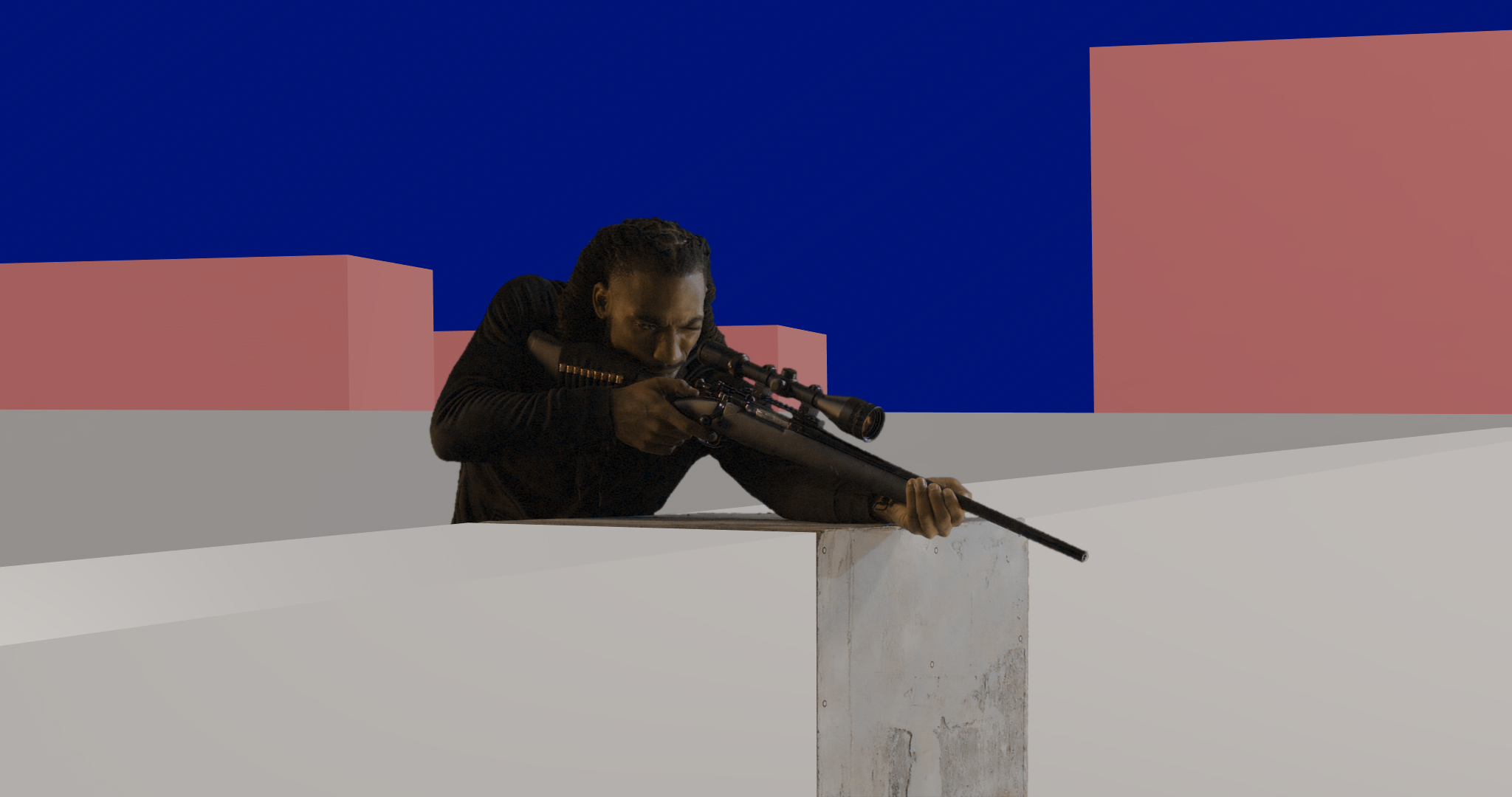
Finding the sweet spot between traditional compositing and generative AI is currently one of the most exciting challenges in VFX. I recently wrapped up a shot that perfectly encapsulates this hybrid approach, relying on traditional spatial blocking in After Effects and letting AI handle the heavy lifting for the environment generation.
Here is a breakdown of the workflow, the tools used, and a few quirks I noticed along the way.
The Brief & Scenario
The Setup: A client needed a gritty, grounded cinematic shot for a tactical shooter promo.
The Action: A sniper positioned on a concrete rooftop takes a high-recoil shot at an off-screen target, set against an ordinary, quiet cityscape at night.
The Catch: The only supplied material was a single, static shot of an actor performing the action in front of a studio greenscreen. No environment plates or 3D environment assets were provided.
Instead of building a matte painting or full 3D environment from scratch, I used this as an opportunity to test an AI-assisted pipeline using Nano Banana and Kling AI.
Step 1: The Foundation (After Effects)
Everything started in After Effects. To get a clean slate, I applied Keylight to pull the greenscreen, isolating the actor completely.
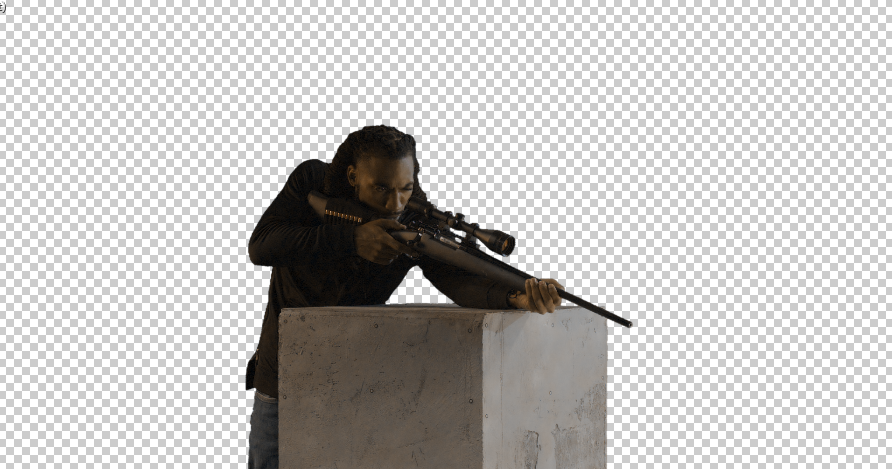
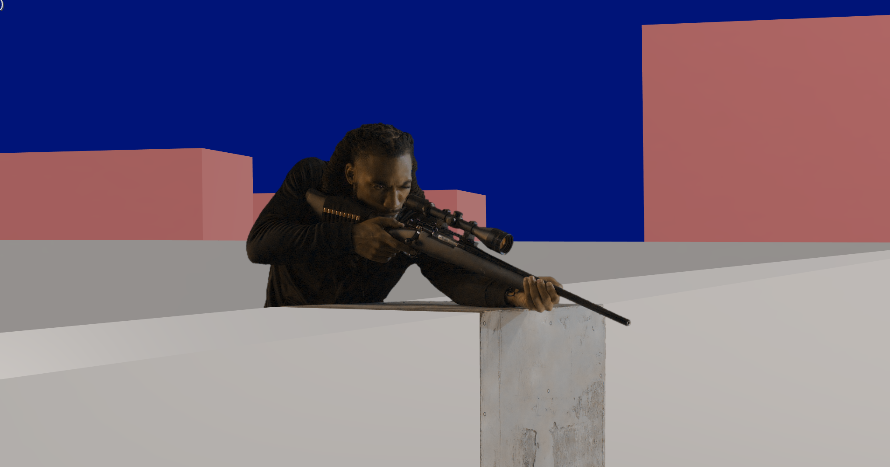
Since AI video generators need robust spatial context to understand depth and geometry, I couldn’t just feed the alpha channel into a generator. I built a rough 3D spatial block-out directly in AE to serve as a guide:
- Grey 3D Cubes: Placed around the actor to map out the concrete rooftop and ledge.
- Red 3D Cubes: Placed in the background to indicate the scale and placement of the distant apartment buildings.
- Blue Solid: Placed at the very back to act as the night sky placeholder.
Step 2: Look Dev (Nano Banana)
With the spatial blocking complete, I exported the First Frame (FF) of this sequence.
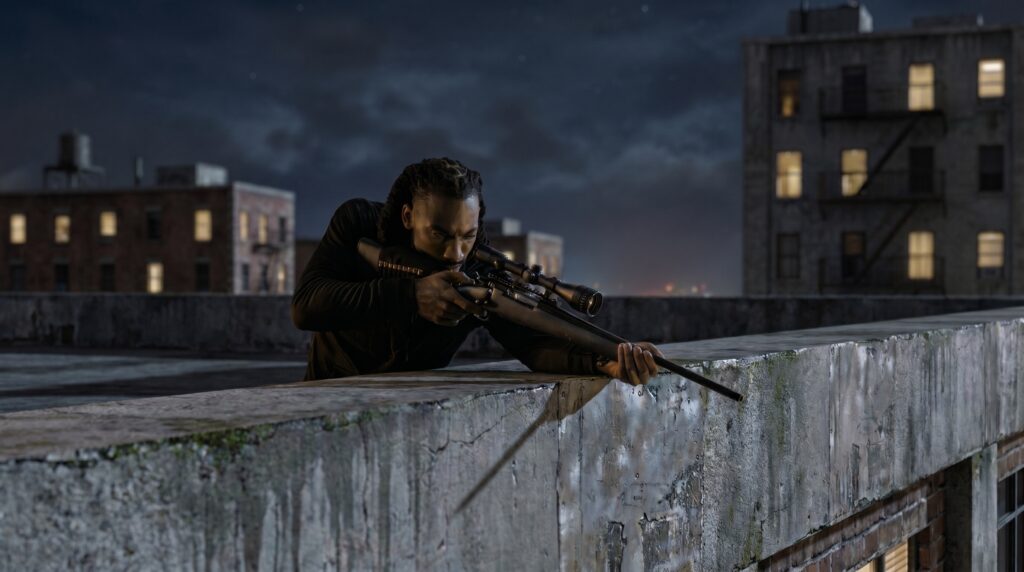
I brought this FF into Nano Banana to establish the art direction. I prompted the model to interpret my colored cubes, turning the grey blocks into weathered, stained concrete, the red blocks into realistic brick apartment buildings with fire escapes and water towers, and the blue solid into an overcast night sky.
It took a few iterative generations, but the geometry blocking held up perfectly and guided the generation exactly where I needed it.
Step 3: Motion Generation (Kling AI)
This is where the process becomes incredibly interesting. I took the original reference video (the keyed actor interacting with the primitive colored 3D cubes) along with the finalized First Frame from Nano Banana, and ran them through Kling AI.
A big reason I used AI for this shot was to handle the transient effects. I prompted Kling to produce the muzzle flare, muzzle smoke, and dust particles exactly when the actor acted out the shot being fired. The environmental consistency was fantastic. The AI tracked the structural intent of the cubes and populated the realistic urban background beautifully behind the actor’s movements while successfully generating the gunfire effects.
The Caveat: One interesting quirk I noticed was how Kling interpreted the actor’s final pose. The recoil itself matched the original footage perfectly, but at the very end of the action, Kling repositioned the rifle back to its original starting position. In the original greenscreen footage, the actor actually kept the rifle held slightly backward due to the recoil weight. It is a great reminder that while AI is excellent at style transfer and environment generation, strict kinetic accuracy still requires a watchful eye.
Step 4: Final Compositing (After Effects)
With the muzzle flash and smoke successfully generated by Kling, I brought the output back into After Effects for the finishing touches.
I tied the whole shot together with some optical glow, a subtle vignette, and a cinematic color grade to unify the AI-generated city with the actor’s original lighting.
Final Thoughts: Using primitive 3D shapes to control AI generation is an incredibly effective workflow. By defining the volume and depth explicitly in After Effects, you drastically reduce the AI’s tendency to hallucinate structural details, allowing you to focus entirely on art direction and finalizing the composite.
